Migration FAQ
General
We want you to have the best care journey. So, we made a more personalized version of the Onduo care program and a new app called Verily Me that has updated features.² This includes tools that make it easier and faster to manage your day-to-day health.
Getting started
Starting on your switch date, the Onduo app's main features will no longer work. This includes messaging your coach and logging your meals and activities. This date is in November for some members. And it’s in December for other members. Your date is based on your health plan or employer. Find your date in the emails from Onduo about the switch to your updated care program and new app called Verily Me.
You will access your updated care program in the Verily Me app. Here’s how to make the switch without any breaks in your care:
- Open the Onduo app.
- Tap ‘Enroll in Verily Me’
- Follow the steps to enroll.
This is the easiest way to sync your Onduo account and data to your updated program in the Verily Me app.
On December 15, 2025, you can still click ‘Enroll in Verily Me’ from this page or the email sent from Onduo. But you will need to enter these details to link your Onduo account:
- Your Onduo sign-in email, and
- Your health insurance ID number,
- Or your employee ID number
Your switch date is based on your health plan or employer. Some members can switch in November. And some members can switch in December. Find your date and program details in the emails sent from Onduo.
Other people can get the Verily Me app and use certain features. But people who are currently part of Onduo care programs should follow the steps sent by Onduo to stay on track.
If you have the Verily Me app and have already signed in to use its other features, you must re-enroll in your care program. You can re-enroll starting in November or in December. For help re-enrolling in your updated care program, please:
- Email support@onduo.com
- OR
- Call 1-833-446-6386
For help with the email address that is linked to your Onduo account, please:
- Email support@onduo.com
- OR
- Call 1-833-446-6386
Please switch by December 14, 2025. This is the easiest way to switch, so you don't have any breaks in your care. Tap 'Enroll in Verily Me' in the Onduo app. Or tap the link in the email sent by Onduo. Log in with your Onduo email to sync your data and account.
On December 15, 2025, you can still tap 'Enroll in Verily Me' to make the switch. But you must enter these details to link your Onduo account:
- Your Onduo sign-in email
- Your health insurance ID number
- Your employee ID number
After the Onduo app is turned off, you can still enroll in your updated care program and download the new app. But you must enter these details to link your Onduo account:
- Your Onduo sign-in email
- Your health insurance ID number
- OR
- Your employee ID number
The Verily Me app is free to download; however, you may incur costs for devices or supplies depending on your benefits package.³ For more information, please contact your employer or health plan.
Keeping my Onduo data
Your care team will still see your health history after you make the switch. But make a copy of any details you may want to know or share before the Onduo app is turned off.
Take a screenshot, or jot down things like:
- Insights
- Food and drink history
- Activity
- Weight
- Medication logs
- Mood logs
- Blood pressure readings (if applicable)
- Blood glucose readings
- Blood glucose: Go to 'For my doctor - BGM' OR 'For my doctor - CGM' reports in 'Settings’.
- Blood pressure: Go to ‘For my doctor - BP' data in ‘Settings’
- Log into the new app with the same email you used for Onduo. This will connect your information and care team to your account and the new app. Your care team will have your health history and data.
- Follow the steps on the home screen to personalize your program.
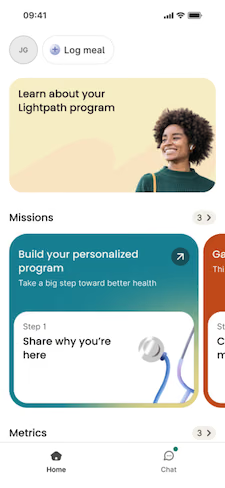
You can access your blood glucose readings from the Verily Me app. Open the Verily Me app and tap the blood glucose tab in the top menu.Or you can access them from your Telcare meter. Here’s how:
- Log into http://mytelcare.com
- OR
- Download the Diabetes Pal app
You won’t be able to access your blood pressure readings from the Verily Me app right away. But you can access them through the OmronConnect app. Here’s how:
- Download the Omron Connect app
- Follow the Bluetooth pairing instructions
You can also download your recent blood pressure readings from the Onduo app before November or December. Just go to ‘For my doctor - BP' data in ‘Settings’. Or take screenshots of your ‘History’ tab to save your individual readings.
Yes. You will keep working with your same care team with the updated program. Your coach, physician, and other care team members will be ready to connect with you in the Verily Me app. Make sure you use your Onduo sign-on to link your account and care team details.
You can keep messaging your coach, physician, and other care team members in the Onduo app before it turns off in November or December. Once the app is turned off, you won't be able to use the messaging feature. But don't worry. You can still reach your care team through the Athena portal.
If you don’t have access to Athena and need to message your care team, please contact your support team:
- Email them at support@onduo.com
- OR
- Call them at 1-833-446-6386
Devices
Connecting your blood glucose: Your Philips blood glucose meter sends your readings to the Philips Telcare portal. Your readings will also sync with the Verily Me app so you can access them there.
Connecting your blood pressure cuff: Use Health Kit on iPhone or Health Connect on Android.
If you need help, please contact your support team:
Yes. You can still order supplies with your updated care program. After you log in, your coach will walk you through that process.
Please note, you may have to pay for some supplies. Talk to your employer or health plan about any costs.
Tech Support
For help resetting your password, please contact your support team:
If you need help, please contact your support team:
- Email them at support@onduo.com
- OR
- Call them at 1-833-446-6386
Note: You can still enroll in your updated program and download the Verily Me app to access it after the Onduo app turns off. Here's how:
- Click the 'Enroll in Verily Me' link in your email.
- Log in with your Onduo sign-on email to sync your account.
Disclaimers
¹ Onduo offers certain care management and coordinated clinical care programs for eligible individuals, as further described at onduo.com. Onduo Management Services LLC, Onduo LLC and a network of affiliated professional entities (collectively, "Verily Onduo") collaborate to offer the services. Verily Onduo services are meant to be used in conjunction with regular in-person clinical services and not intended to replace routine primary care.
² Verily makes available virtual care management programs for eligible individuals, as further described in this document and at Verily.com, and works with the following organizations who coordinate to deliver their respective services through the technology solution developed by Verily Health Inc.: Onduo Professionals PC and other affiliated professional entities delivering clinical care; and Onduo Management Services LLC (“OMS”) and Onduo LLC (a licensed durable medical equipment company), wholly owned subsidiaries of Verily Health Inc.
³ There is no cost for most members. Certain employee benefit plans and health plans, including qualified high deductible plans may result in out of pocket charges for some services and supplies in this solution. To determine if you have any costs for care, you can call the Member Service team at the number on the back of your ID card. If you are eligible, you will receive an invitation to enroll. Eligibility is determined by several factors including your medical status, health plan coverage and historical medical claims. If you are not initially able to enroll, you may be able to upon meeting eligibility criteria.
Verily Me is not a medical device and has not been evaluated by the FDA. Consult with a qualified healthcare professional before making any decision related to your health or treatment.
Eligibility is determined by several factors including your medical status, health plan coverage and historical medical claims. If you are not initially able to enroll, you may be able to upon meeting eligibility criteria.The Verily virtual care management programs are not intended to support individuals who are pregnant, have an organ transplant history of any kind, have a heart condition requiring a ventricular assist device (e.g., LVAD), are living with any of the following: severe or end stage kidney failure, cirrhosis or liver failure, dementia (e.g., Alzheimer’s disease), or cystic fibrosis.